Writing by shivdev on Tuesday, 25 of March , 2008 at 11:47 am
Need to trunc dates in SQL Server? Follow the examples below.
SELECT DATEADD(HOUR, DATEDIFF(HOUR, 0, GETDATE()), 0)   -- 2008-03-25 10:00:00.000
SELECT DATEADD(DAY, DATEDIFF(DAY, 0, GETDATE()), 0)     -- 2008-03-25 00:00:00.000
SELECT DATEADD(MONTH, DATEDIFF(MONTH, 0, GETDATE()), 0) -- 2008-03-01 00:00:00.000
SELECT DATEADD(YEAR, DATEDIFF(YEAR, 0, GETDATE()), 0)   -- 2008-01-01 00:00:00.000
Category: SQL DB
Writing by shivdev on Tuesday, 18 of March , 2008 at 5:11 pm
Need a quick workaround to declaring arrays in SQL Server?
-- Trying to accomplish something like this?
int[] @list = {1864, 1966} -- INCORRECT SQL
SELECT * FROM Employees
WHERE id IN @list
Here’s a workaround
DECLARE @list TABLE (id int)          -- create an int[] "array"
INSERT @list VALUES (1864)            -- hardcode values
INSERT @list VALUES (1966)            -- hardcode values
SELECT * FROM Employees               -- my query
WHERE id IN (SELECT id FROM @list)    -- use the int[] array
Category: SQL DB
Writing by shivdev on Monday, 29 of October , 2007 at 4:15 pm
Having trouble getting your application connecting to SQL Server 2005? You probably think there’s something wrong with JDBC driver or your connection URL etc. It could be – but for me it turned out that default installation of SQL Server 2005 configured it to port 1036 instead of the default 1433. Who Knows? Don’t Ask. Maybe 1433 was in use by some other program or by SQL Server 2005 because it didn’t get uninstalled correctly.
Looked around for a bit and here’s a nice link if you want to read how.
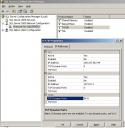
Or you can simply
- Click Start -> Programs -> Microsoft SQL Server 2005 -> Configuration Tools -> SQL Server Configuration Manager
- Go to SQL Server 2005 Network Configuration
- Right Click on TCP/IP
- Click the IP Addresses Tab
- Change the port in the IPAll section
Category: SQL DB
Writing by shivdev on Monday, 29 of October , 2007 at 3:04 pm
Yes, I agree – Its painful. But remember, its Free. And the price to pay is that you have to do some some searching around to work around your problems. But yes, Microsoft should have been a little more relaxed and made life for us developers a little easier.
So my pain started with this error message.
Server: Msg 3205, Level 16, State 2, Line 1
Too many backup devices specified for backup or restore; only 64 are allowed.
Server: Msg 3013, Level 16, State 1, Line 1
RESTORE DATABASE is terminating abnormally.
Turns out they had installed SQL Server 2005 and then SQL Server 2000 (earlier version) later and that caused the screw up. There is a way (I don’t know yet) where you can override which version to use, for compatibility purposes. This link will tell you that its a forward compatibility issue. In my case, SQL Server 2005 was used for backing up and restoring.
So I went ahead and removed both these versions and reinstalled SQL Server 2005 Express Edition and thats when the real PAIN started.
An error has occurred while establishing a connection to the server. When connecting to SQL Server 2005, this failure may be caused by the fact that under the default settings SQL Server does not allow remote connections.
Remember, you have to configure SQL Server to allow remote connections. These posts show how.
But it STILL DID NOT WORK !!! Did some more searching and found the Problem.
The trick is in specifying the Server Instance correctly. By default it is SQLEXPRESS. So, if you were on the same machine your Server instance would be localhost/SQLEXPRESS. This post saved me
So there you go folks. Who would know SQLEXPRESS is the default instance name? Why don’t they just default it? Why don’t they just enable TCP/IP & named pipes for remote connections and save us the trouble? I mean I understand security concerns, but damn it there’s no data – Its an empty database. Once I have data I will disable whatever I don’t want.
Category: Rants/Raves,SQL DB