Writing by shivdev on Saturday, 21 of July , 2012 at 9:50 am
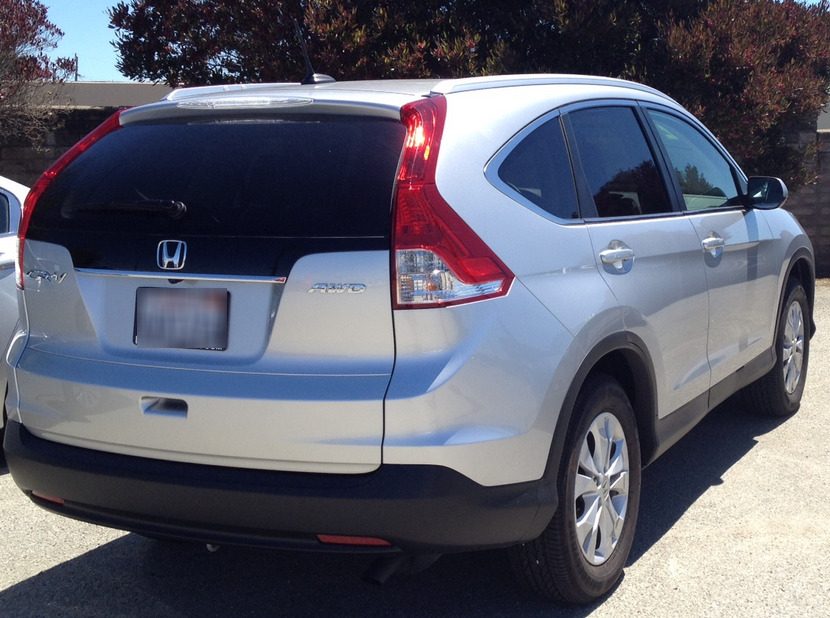
Having driven couple of stick shift cars for 14 years, I decided to get a new Compact Crossover – a 2012 Honda CR-V EX-L AWD w/ Nav. Having read so many discussions and the negative propaganda on SUVs I felt that I was making a mistake. After buying the CR-V and driving it around, I knew I had made the right choice and a practical one that. All this criticism about SUVs and Crossovers is done by folks that don’t own or haven’t really driven them around.
My wife has a V6 Toyota RAV4 and I always loved driving it so much that I had to get myself another compact crossover. So why do I think it makes sense in the Bay Area?
Remember, Bay Area Freeways get extremely and annoyingly busy during peak hours and the drivers have varied driving styles. (Not really going to stereotype here.)
Much Better Visibility
This is my primary reason. In the Bay Area where there are so many SUVs on the road and with drivers slamming their brakes all the time, sitting in a car just didn’t give me a sense of the traffic a few cars ahead. As a defensive and cautious driver, you’ve got to have a feel of the traffic ahead, otherwise the car in front of you is going to slam his brakes without your anticipation. In an SUV, you are sitting higher and so can gauge what’s out there and anticipate that ‘Stop and Go’.
Usually Automatic Transmission
I am never buying a stick shift car/SUV again at least in the Bay Area and not if it will be my only vehicle. It really becomes so stressful driving, especially with the Stop and Go traffic, accidents, packed freeways and the traffic lights that seem to always go Red on you. For me, all this stress was simply gone! I don’t think about it anymore. The show-offs that want the manual transmissions can buy them, but the fact of the matter is in the Bay Area where there are like 95% automatics people will drive like they’re in automatics. PERIOD. You have to keep shifting and keep cursing which is just unnecessary stress. I loved driving stick shifts, but on weekends. The 2012 Honda CR-V does not even have a manual transmission option. Personally, it doesn’t matter to me whether its a 5 speed or 6 speed auto transmission, since I’m not shifting anymore.
Fuel Efficiency
Here are the specs for the 2012 Honda CR-V: 23/31/26 for the 2WD and 22/30/25 for the AWD (IMO – a pretty good sacrifice).
My AWD version gives me over 28 mpg (combined) with ECON turned ON most of the time. My 2000 Civic was around 31 (combined). Now folks, is it really a gas guzzler? At 28 mpg combined, its pretty much like a car. It’s not a Prius, but pretty acceptable. The 2012 Honda CR-V sacrifices performance for fuel efficiency, so while your 0-60 may take you well over 10 seconds, your not breaking the bank at gas station. Again, in the Bay Area during peak hours you can’t do 60, so who cares?
More Room
The trunk in my car was packed with my gym bag, tennis ball hopper, racquets, swim gear etc. that going to Costco was getting to be a hassle especially when my wife had thrown three 5 gallon water dispensers. I ended up loading the front and back seats. SUVs will naturally win here. The 2012 CR-V has a cool feature where you can completely fold the back seats by pulling a strap, in cases where you really need the room. There’s really enough room to comfortably sit people in the back seat.
Handling, Driving Ease and Comfort
This is probably a Honda thing, but the seats are really comfortable. The 2012 CR-V feels and handles more like a car. The interiors on the EX-L w/ Nav are really luxurious and the redesign definitely makes it look very hip and sporty. It is not and does not look cheap!
AWD/4WD Option
If you’re going up to snow country for some skiing, there are more 4WD options with SUVs than cars. You never know when you might need all the wheels and for 1 mpg drop on the 2012 CR-V, I thought it was a decent sacrifice.
Price
Depending on what you’re looking for this might be tricky, but I negotiated like crazy (a 4 week period) and got a good deal on the 2012 CR-V EX-L w/ Nav. I would say that you could get a fully loaded CR-V at around the same price as an Acura TSX Base, but you could get a Honda Civic for way less. I believe that this should by far the most important decision making factor.
To sum up, smaller cars definitely win when it comes to fuel efficiency, parking, handling and cost. But with luxury cars you will lose out on fuel efficiency and cost. Depending on your choice of SUV or crossover you might be able to weigh in the benefits and compromise on lacking areas. For me, really a vehicle is a way to comfortably get to and back from work with occasional road trips rather than a serve as a status symbol. Although I went a little overboard with a top of the line CR-V, I really enjoy the added features and I think it’s a practical vehicle.
Category: Reviews
Writing by shivdev on Thursday, 7 of June , 2012 at 5:06 pm
You can use PreparedStatement to compile the SQL and then get the ResultSetMetaData from it.
// Get the Connection
Connection conn = getConnection();

// Get the MetaData
PreparedStatement ps = conn.prepareStatement(sql);
ResultSetMetaData rsmd = ps.getMetaData();

// Get the alias & type
for (int i=0; i<rsmd.getColumnCount(); i++) {
   String alias = rsmd.getColumnName(i+1);
   String strType = rsmd.getColumnTypeName(i+1);
   int type = rsmd.getColumnType(i+1)
}
Category: Java,SQL DB
Writing by shivdev on Thursday, 24 of May , 2012 at 9:28 pm
Open the class and use Ctrl + O to show/hide inherited methods.
Category: Eclipse
Writing by shivdev on Wednesday, 23 of May , 2012 at 5:45 pm
I Did NOT have this problem when my Synergy Server was on Windows. When I switched my Synergy Server to my Red Hat Linux box, I noticed my Back/Forward mouse buttons didn’t work.
After searching around for a bit, adding the following lines to your synergy.conf file fixed this.
$ sudo vi /etc/synergy.conf
section: options
mousebutton(6) = keystroke(WWWBack)
mousebutton(7) = keystroke(WWWForward)
mousebutton(4) = ;
mousebutton(5) = ;
end
So with my current setup (sk-win7 <-> sk-redhat <-> sk-ubuntu) with sk-redhat being my Synergy Server, my /etc/synergy.conf looks like:
section: screens
sk-redhat:
sk-win7:
sk-ubuntu:
end
section: aliases
sk-win7:
10.4.1.1
end
section: links
sk-redhat:
left = sk-win7
right = sk-ubuntu
sk-win7:
right = sk-redhat
sk-ubuntu:
left = sk-redhat
end
section: options
mousebutton(6) = keystroke(WWWBack)
mousebutton(7) = keystroke(WWWForward)
mousebutton(4) = ;
mousebutton(5) = ;
end
After adding this section, I was able to get my mouse back/forward buttons to work on all of my boxes.
Category: Tips and Tricks,Tools
Writing by shivdev on Friday, 18 of May , 2012 at 5:25 pm
The below example will demonstrate how shivdev@sk-optiplex can SSH to shivdev@sk-redhat without a password. The idea is to create SSH (public/private) keys on sk-optiplex and then copy the public key /home/shivdev/.ssh/id_dsa.pub from sk-optiplex over to sk-redhat as ./ssh/authorized_keys2.
I’m using SSH 2 with DSA encryption, because I just couldn’t get SSH with RSA encryption to work.
shivdev@sk-optiplex:~$ ssh-keygen -t dsa
Generating public/private dsa key pair.
Enter file in which to save the key (/home/shivdev/.ssh/id_dsa):
Enter passphrase (empty for no passphrase):
Enter same passphrase again:
Your identification has been saved in /home/shivdev/.ssh/id_dsa.
Your public key has been saved in /home/shivdev/.ssh/id_dsa.pub.
The key fingerprint is:
73:4a:b1:d3:d6:3c:fc:ed:c7:c6:61:18:0f:fb:06:6b shivdev@sk-optiplex
The key’s randomart image is:
+–[ DSA 1024]—-+
| |
| |
| . |
| + + o |
| S + = * |
| . * * = |
| . *oo|
| E +=|
| . ..o|
+—————–+
shivdev@sk-optiplex:~$ scp /home/shivdev/.ssh/id_dsa.pub shivdev@sk-redhat:.ssh/authorized_keys2
The authenticity of host ‘sk-redhat (sk-redhat)’ can’t be established.
RSA key fingerprint is b4:3a:15:5d:cb:5d:7e:05:39:35:0d:9c:1f:d4:84:08.
Are you sure you want to continue connecting (yes/no)? yes
Failed to add the host to the list of known hosts (/home/shivdev/.ssh/known_hosts).
shivdev@sk-redhat’s password:
id_dsa.pub 100% 610 0.6KB/s 00:00
shivdev@sk-optiplex:~$ ssh shivdev@sk-redhat
The authenticity of host ‘sk-redhat (sk-redhat)’ can’t be established.
RSA key fingerprint is b4:3a:15:5d:cb:5d:7e:05:39:35:0d:9c:1f:d4:84:08.
Are you sure you want to continue connecting (yes/no)? yes
Failed to add the host to the list of known hosts (/home/shivdev/.ssh/known_hosts).
Last login: Thu May 17 14:48:01 2012 from 10.4.21.184
[shivdev@sk-redhat ~]$
As you can see after copying over the public key from shivdev@sk-optiplex:.ssh/id_dsa.pub over to shivdev@sk-redhat:.ssh/authorized_keys2, shivdev@sk-optiplex is able to SSH into shivdev@sk-redhat without a password.
If you do get this error “Agent admitted failure to sign using the key.”, then you might need to run ssh-add or logout of the terminal and try to login again.
shivdev@sk-optiplex:~$ ssh shivdev@sk-redhat
Agent admitted failure to sign using the key.
shivdev@sk_redhat’s password:
shivdev@sk-optiplex:~$ ssh-add
shivdev@sk-optiplex:~$ ssh shivdev@sk-redhat
Last login: Thu May 17 14:51:01 2012 from 10.4.21.184
[shivdev@sk-redhat ~]$
Category: Linux,Tips and Tricks
Writing by shivdev on Monday, 23 of April , 2012 at 12:37 pm
I would definitely recommend it for those who want to set foot in China and get a feel of the city’s hustle and bustle and enjoy some great local food.
I had a 15 hour halt in Hong Kong and didn’t really plan anything, and thought I’d take a tour, but then I decided against it since I just wanted to do get a feel of the city like the locals. First Impression – New York City, but with Chinese people! Not everyone speaks English – so don’t believe what you read elsewhere. You might have to talk to the friendly Europeans there. Very few locals spoke English. It’s pretty safe, so no worries.
So, once you get to Hong Kong, just do your immigration. They are smart they don’t usually charge for Visas. They know you will spend in Hong Kong. I got a 14 day Free Visa. Just amazing!
You can take a guided tour or just explore the islands yourself.
Get the MTR Tourist Day Pass $55 HKD (You will need to get a connection from Airport to Tsing Yi for about $60 HKD return trip)
It’s pretty easy to navigate and here’s something that I did and would recommend (in this order to save time):
- You definitely want to go to TST (Tsim Sha Tsui) on the MTR and take the Avenue of the Stars Exit for a spectacular view
- Take the $2.50 HKD Ferry (Yes – Real Cheap) to Hong Kong Central
- Explore Central Area
- Take a cab to Victoria Peak Station, then take the tram up to Victoria Peak
- Come back down, and take Bus 15C back to Central MTR
- Go to Wan Chai Computer Center if you’re into gadgets etc. – just outside Wan Chai MTR
- Or perhaps shopping at Times Square at Causeway Bay MTR
- Add other stops if time permits
Eat at any of the several restaurants on the way and then head back over the airport in time to catch your flight. All in all, a Great city, Fantastic super-clean MTR and local transporation, friendly people, great food and yes – a concrete jungle! You will be amazed if you’re into skyscrapers.
Category: Travel