Writing by shivdev on Wednesday, 11 of January , 2012 at 9:42 pm
Enter the damn DHCP IP Address in your /etc/hosts and map it to your hostname
$ sudo vi /etc/hosts
# Assuming DHCP that my machine pulls 10.4.11.11. and hostname is wimbledon
10.4.11.11 wimbledon
This will solve several of your problems. Some of the Linux pain points.
For me they were,
NX Nomachine was not able to connect to the server. Server Configuration Error and some weird errors in the details.
P4 Eclipse Plugin was coming back with perforce error: unable to determine client host name
In my Java product, I was getting UnknownHostExceptions
and several others…
Well there you go! This is a MUST DO after Linux installation.
Category: Linux,Tips and Tricks
Writing by shivdev on Wednesday, 4 of January , 2012 at 6:40 pm
Sometimes you want to avoid clutter in your Eclipse Workspace Launcher and might want to remove obsolete workspaces.
Clean up the value for RECENT_WORKSPACES key, located in the org.eclipse.ui.ide.prefs file.
$ECLIPSE_HOME/configuration/.settings/org.eclipse.ui.ide.prefs
Restart eclipse and it should be gone.
Category: Eclipse
Writing by shivdev on Monday, 5 of December , 2011 at 6:25 pm
Problem 1:
Can you escape keys or values in a properties file? Yes. Use backslash \ as the escape character.
So Hello World=foo should be written as Hello\ World=foo
Wikipedia has an excellent article
Problem 2:
You might most probably use the String replaceAll(String regex, String replacement) method. So how do you escape spaces?
// This Will NOT WORK !!
String escaped = “Hello World”.replaceAll(” “, “\\ “);
// This is the right way to do it, since we need to work with regex
String escaped = “Hello World”.replaceAll(“\\s”, “\\\\ “);
Category: Java
Writing by shivdev on Friday, 2 of December , 2011 at 12:36 am
Here’s an example of converting a Mac Address 01:23:45:67:89:ab into a decimal number (1250999896491), using the MySQL conv() function.
The idea is select CONV(‘0123456789ab’, 16, 10); — 01:23:45:67:89:ab without the :
select CONV(REPLACE(SUBSTR(’01:23:45:67:89:ab’, INSTR(’01:23:45:67:89:ab’, ‘(‘)+1, 17),’:’,”),16,10);
Results In: 1250999896491
Category: SQL DB
Writing by shivdev on Thursday, 10 of November , 2011 at 8:08 am
I just took the betterprogrammer.com Java Test before going to bed and got a 96% on my certificate.
Pretty good questions on the test in my opinion.
Category: Java
Writing by shivdev on Sunday, 30 of October , 2011 at 10:08 pm
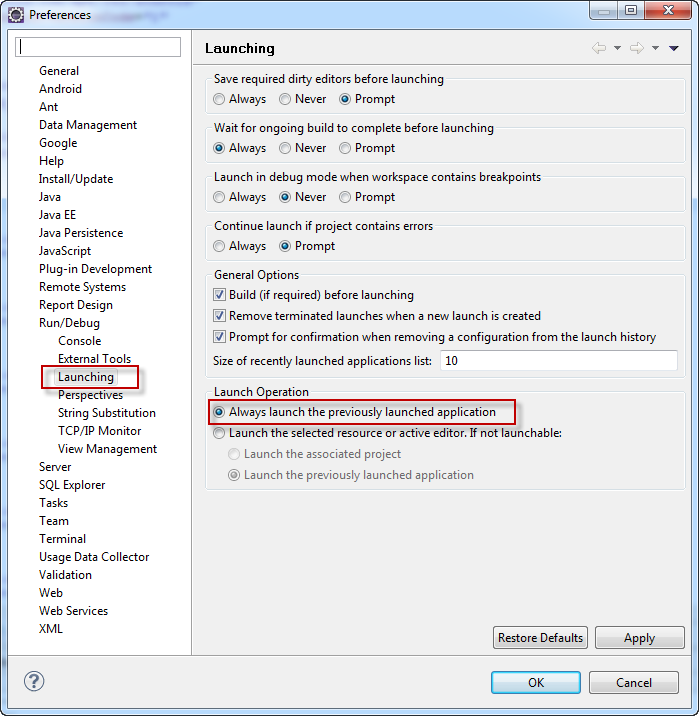
Usually with Android development in Eclipse, you will often be working with XML Files and trying to mess with them. Now while testing your app you will find a file.out.xml that gets created that completely messes up the Android build and shows errors. One way to avoid this is to use the following Settings in Eclipse.
Window -> Preferences -> Run/Debug -> Launching -> Launch Operation -> Always launch the previously launched application
Category: Android,Eclipse