Writing by shivdev on Thursday, 18 of December , 2008 at 10:41 am
If you’re trying to integrate a changelist 177256 from src branch to target branch
p4 integ //depot/src/main/…@177256,@177256 //depot/target/main/…
For more infor visit P4 Knowledge Base.
Category: Perforce
Writing by shivdev on Wednesday, 29 of October , 2008 at 2:44 pm
I’ve been using Synergy for quite a while now and I find it extremely useful. I’ve demonstrated how I use Synergy and simplified my life by keeping the monitors and using one keyboard and one mouse across different computers.
What I’ve done, is used my primary KB and Mouse across my Win-XP Laptop, Win-XP Desktop and Cent OS (Linux Box). So, I installed Synergy on all computers and configured Synergy with my Win-XP Desktop as the server and the clients which are my Laptop and Linux box share the server’s KB and mouse.
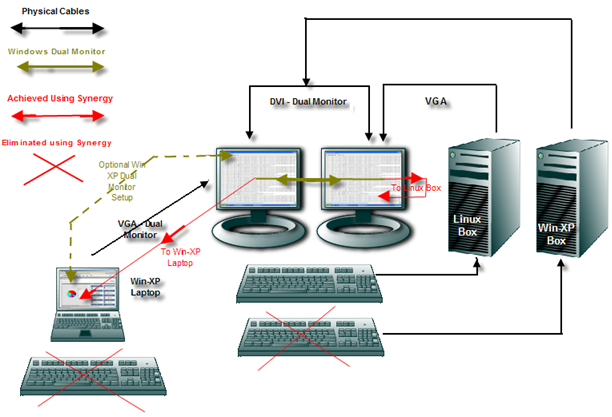
Setting up Synergy is pretty simple. Configure the server and let it know what machines are on it’s left and what machines are on it’s right. For instance
- Win-XP Laptop is to the Left of Win-XP Desktop
- Win-XP Desktop is the Right of Win-XP Laptop
- Linux Box is to the Right of Win-XP Desktop
- Win-XP Desktop is the Left of Linux Box
Start up your Synergy server and Synergy clients and thats it! What I also love about Synergy is the ability to copy, paste between computers. Yes – RDP does it too, but again if you want to use other monitors and share the same KB and mouse then this is really fantastic. It’s a really cool tool.
Category: Tips and Tricks
Writing by shivdev on Thursday, 16 of October , 2008 at 10:34 am
If you’re wondering about .pssx file extension – it’s a presentation saved using Powerpoint 2007.
To open it simply download the Microsoft Office Compatibility Pack for Word, Excel, and PowerPoint 2007 File Formats and install it.
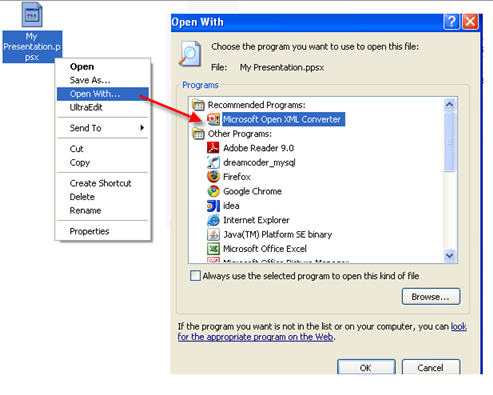
Then, Right click on the Document to open, Select Open With… and chose Microsoft Open XML Converter to view the contents of the file.
Category: Tips and Tricks
Writing by shivdev on Wednesday, 15 of October , 2008 at 11:36 am
I was trying to increase eclipse heap size and setting it to 1024MB and that wouldn’t work. Reducing it to 768MB did the trick for me.
C:\eclipse\eclipse.exe -vmargs -Xmx768M
Later, after installing Your Kit Profiler and trying to add a plug in for eclipse, I started seeing the same error. So I opened up the eclipse.ini and removed the –launcher.XXMaxPermSize 256m option.
Category: Java
Writing by shivdev on Monday, 8 of September , 2008 at 3:52 pm
findJAR.com is an excellent JAR search engine that helps to find JAR files containing required Java classes. Just enter the name of a class or the JAR file you’re looking and Search. findJAR.com can be used to easily resolve NoClassDefFoundError and ClassNotFoundException problems. Just awesome.
Category: Java,Rants/Raves
Writing by shivdev on Friday, 5 of September , 2008 at 9:53 am
I love it! Super fast – Gold Medal when it comes to speed of rendering pages. People have successfully managed to crash it, however for regular browsing its fantastic!
I think it’s good to have two browsers competing with Internet Explorer now, simply because Chrome and Firefox will comply to Web standards (bad thing for some who’re using some of “extra” features of Internet Explorer).
From a Web Developers point, very similar to Firefox rendering in terms of look and feel, spacing etc. of the rendered page, though I spotted one difference with iframes (I think), which showed up in a tab within the main tab. I think developers will now also need to test their app on Chrome for minor differences.
My first impression – very fast, very similar to Firefox, lot of cool features with attention to detail. However, I’m not yet ready to switch from Firefox.
Category: Rants/Raves