Writing by shivdev on Monday, 5 of November , 2007 at 3:07 pm
Are you trying to enable RSS Feeds in WordPress and they don’t seem to work? You may have played around with the template files, default wordpress files and that most likely might have caused the problem. By default wordpress should be setup so that your RSS works correctly. Are you getting a message saying No input file specified.
Usually the format for the RSS Feed is of the form
http://shivdev.com/blog/feed/
http://shivdev.com/blog/index.php/feed/
http://shivdev.com/comments/feed/
Do not forget the / at the end – feed/. If you don’t have Permalinks, they are usually of the form
http://www.shivdev.com/?feed=rss2
http://www.shivdev.com/?feed=comments-rss2
If the link seems correct, but you still can’t get it to work, go back to the original (default) theme and see what errors you get. Maybe some adsense or analytics javascript in the wrong place etc. Correct the errors and you should be able to get your RSS to work.
You might also want to refer to How to enable RSS feeds? and Create RSS Feeds on any web page
Category: Wordpress
Writing by shivdev on Friday, 2 of November , 2007 at 2:33 pm
Want to convert 1/20/2007 to 1/1/2007 in Excel?
Use the DATE excel function.
=DATE(YEAR(A1),MONTH(A1),1)
Category: Excel
Writing by shivdev on Tuesday, 30 of October , 2007 at 10:08 am
Want a quick way of adding Adsense to your content? And something real simple to use.
- Download & Install it into the wordpress wp-content/plugins folder
- Activate the plugin from admin page
- Go to Options Tab -> AdsenseDeluxe SubTab
- Add a New Adsense Block and then turn it on
- If your version complains about Cannot load adsense-deluxe.php follow the steps here
- In places where you need to put your ad just paste the following comment such as <!–adsense–>
Category: Wordpress
Writing by shivdev on Tuesday, 30 of October , 2007 at 9:57 am
So did you install adsense-deluxe-v0.8 recently, activated it successfully and end up with this error.
Cannot load adsense-deluxe.php
To fix this problem copy the adsense-deluxe.php file from the wp-content/plugins/adsense-deluxe_wp_plugin_v0.8 into the parent wp-content/plugins folder and then it’ll load great. I found the solution at on blog
Category: Wordpress
Writing by shivdev on Tuesday, 30 of October , 2007 at 12:11 am
My Operating Systems professor at Ohio University (a big Microsoft basher) told us, “In the real world, there are just 3 ways to send documents PDF, PostScript and TXT. Thats how I’m going to accept your assignments. And extra points to those who submit their homework in PostScript. I don’t read DOC files.” Hmm… that tone sound familiar? I loved Microsoft Office since it was quick and easy to use, and it was installed in the labs but free PDF Creators weren’t so common, nor could I afford a PDF software like Adobe Acrobat so that was out of question, TXT did not support images so I used LaTeX and submitted my assignments in PS. And boy, was that painful?
These days, PDFs can be created so easily and no wonder why they’re so popular. Here are some of the advantages of PDF files that make me a big fan.
- Simplicity– One single document holds it all, as opposed to HTML which needs images, stylesheets, scripts etc.
- Multi-platform – The same document can be viewed on Windows, Mac, Linux, Solaris etc. and look exactly the same.
- “Read Only” – Cannot be altered without leaving an electronic footprint. As opposed to images that can be easily altered.
- Consistent – Preserve information like text, drawings, fonts, color graphics, photos regardless of the applications used to create them
- Searchable – Full-text support for keywords.
- Interactive – Can be used as Forms for user input as used by US Government for IRS Forms, USCIS, etc.
- Extensible – Generated programmatically for PDF based business solutions like Investor Statements etc.
- Secure – Allow digital signatures and password protection.
The PDF is the de facto standard for secure and dependable electronic exchange and used by industries and governments worldwide. Its a sensation in the printing world.
Category: Adobe,Rants/Raves
Writing by shivdev on Monday, 29 of October , 2007 at 4:15 pm
Having trouble getting your application connecting to SQL Server 2005? You probably think there’s something wrong with JDBC driver or your connection URL etc. It could be – but for me it turned out that default installation of SQL Server 2005 configured it to port 1036 instead of the default 1433. Who Knows? Don’t Ask. Maybe 1433 was in use by some other program or by SQL Server 2005 because it didn’t get uninstalled correctly.
Looked around for a bit and here’s a nice link if you want to read how.
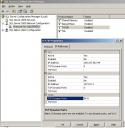
Or you can simply
- Click Start -> Programs -> Microsoft SQL Server 2005 -> Configuration Tools -> SQL Server Configuration Manager
- Go to SQL Server 2005 Network Configuration
- Right Click on TCP/IP
- Click the IP Addresses Tab
- Change the port in the IPAll section
Category: SQL DB