Writing by shivdev on Saturday, 8 of June , 2013 at 3:50 am
On the source machine
[user@sourcemachine ~] echo $DISPLAY
:1011.0
[user@sourcemachine ~] xhost +
On the remote machine
[user@sourcemachine ~] ssh user@remotemachine
[user@remotemachine ~] export DISPLAY=sourcemachine:1011.0
[user@remotemachine ~] /usr/bin/firefox &
OR
[user@sourcemachine ~] ssh -X user@remotemachine
[user@remotemachine ~] /usr/bin/firefox &
With the ssh -X option, you don’t need to worry about DISPLAY, but some applications might not work.
Category: Linux
Writing by shivdev on Monday, 20 of May , 2013 at 6:30 pm
I got this error and found the solution on winscp.net docs.
Edit the session
Change File Protocol to SCP instead of SFTP
Category: Tips and Tricks
Writing by shivdev on Tuesday, 30 of April , 2013 at 10:50 pm
If NX Client is not able to connect to Linux VM and comes back with the following error
DSA key is corrupted or has been protected with a passphrase
You will need to follow steps mentioned in the NX Admin Guide – Section 4.4. Replacing the Default SSH Key-Pair with Keys Generated for Your Server.
Once you follow the steps of generating new keys, you will need use (paste) the new shared key in the NX Client.
#Follow the keygen steps
$ /usr/NX/scripts/setup/nxserver –keygen
$ … … …
# Copy the Key from
$ cat /usr/NX/share/keys/default.id_dsa.key
# Paste this Key in the NX Client (Configure… General Tab -> Key…)
The problem should be resolved.
Category: Linux
Writing by shivdev on Tuesday, 5 of March , 2013 at 6:44 am
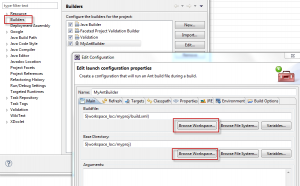
Let’s say you have a buildfile build.xml that builds your project and deploys to say Tomcat. Wouldn’t it be great to have Eclipse do that for your when you build the project within eclipse? Eclipse has this concept called Builders as part of your project properties that let’s you do just that.
- Right Click the Project -> Properties -> Builders
- Select New
- Select Ant Builder
- In the Main tab
- Buildfile -> Browse Workspace… and select the Buildfile
- Base Directory -> Browse Workspace… and select the Base Directory
- In the Refreshtab
- Check Refresh resources upon completion (recommended in most cases)
- Select The project containing the resource or the option that suits you
- In the Targetstab, select the desired targets from the buildfile
When you build (Ctrl+B) in eclipse, the specified ant target will be run for you and in my case, my application will be deployed to Tomcat.
If you want to run a script, you can do so by selecting Program instead of Ant Builder.
Here’s a screenshot of my Ant Builder.
Did you know you could also debug your Ant Script within Eclipse.
Another great post on IBM Developer Works.
Category: Eclipse,Java
Writing by shivdev on Thursday, 21 of February , 2013 at 12:23 am
Using the top -H command to show you the thread ids, and from the thread dump, you can correlate the thread that’s taking CPU time.
For example the stack trace will show you the ID in hex format and the top will show you the thread PID in decimal format.
Notice that nid=0x6c21 (top -H) is the same as 27681 (from the thread dump).
Here’s a thread dump snippet
“http-bio-/127.0.0.1-9090-exec-7” daemon prio=10 tid=0x000000004c433800 nid=0x6c21 runnable [0x00000000644b9000]
INFO | jvm 1 | 2013/02/20 11:51:57 | java.lang.Thread.State: RUNNABLE
INFO | jvm 1 | 2013/02/20 11:51:57 | at java.util.HashMap.put(HashMap.java:374)
Here’s the output of top -H
[root@myserver bin]# top -H
top – 15:56:17 up 5 days, 5:16, 8 users, load average: 2.16, 2.25, 3.28
Tasks: 1038 total, 3 running, 1035 sleeping, 0 stopped, 0 zombie
Cpu(s): 12.8%us, 0.1%sy, 0.0%ni, 87.1%id, 0.0%wa, 0.0%hi, 0.0%si, 0.0%st
Mem: 37043972k total, 35569196k used, 1474776k free, 45720k buffers
Swap: 12586916k total, 228k used, 12586688k free, 18998952k cached
3.00 00:04:50
PID USER PR NI VIRT RES SHR S %CPU %MEM TIME+ COMMAND
27409 shivdev 25 0 11.6g 10g 16m R 99.9 30.7 1305:02 java
27681 shivdev 25 0 11.6g 10g 16m R 99.9 30.7 1304:37 java
Category: Java,Linux
Writing by shivdev on Sunday, 27 of January , 2013 at 7:58 pm
By default, eclipse will suspend the execution on uncaught exceptions and take you directly to the code that you may not really intend to debug. To avoid that set your prefrences:
Window -> Preferences -> Java -> Debug
Uncheck Suspend execution on uncaught exceptions
Category: Eclipse,Java