Writing by shivdev on Saturday, 14 of January , 2012 at 1:40 am
Even though this is not a very common use case, you might need to do this and like just about anything with Linux, there’s a bit of a pain here as well.
The easiest way is to access the Disk Utility and see the Mount Point and just cd to that mount point. For example, cd /media/RHEL_6.1/
Otherwise, follow the steps below or read up on mount and umount (unmount)
Depending on the OS, most likely the cdrom will be at /dev/cdrom, the USB will be at /dev/usb etc. But may change.
# Login as root, then follow these steps
$ mkdir /mnt
$ mount /dev/cdrom /mnt/cdrom
$ cd /mnt/cdrom
$ ls
# To unmount, use the umount command
$ umount /mnt/cdrom
$ ls
Category: Linux
Writing by shivdev on Thursday, 12 of January , 2012 at 1:27 am
Gosh! Another reason I’m not giving Ubuntu 11.10 the Best Thing yet title. Moreover, NX won’t be able to display Unity Launcher and neither would RDP!
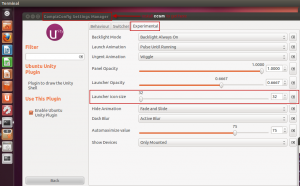
But assuming you’re local and not remote the CompizConfig Settings Manager lets you control it.
Alright if you’ve read my earlier post on Ubuntu 11.10 Must Have Apps and things to do after installation, you probably have already installed ccsm.
- Otherwise just install it: $ sudo apt-get install ccsm
- Launch ccsm $ ccsm
- Go to Desktop -> Ubuntu Unity Plugin
- Click on Experimental Tab
- Use the slider Launcher icon size to resize as per your liking
Category: Linux,Tips and Tricks
Writing by shivdev on Wednesday, 11 of January , 2012 at 9:45 pm
I can’t say Ubuntu 11.10 is the best thing just yet since things are still not simple enough, but I just love the Price for what it can do! Moreover, Ubuntu works perfectly on my 3 year old desktop while Red Hat 6 wouldn’t even recognize the display. For development, I still prefer Linux and therefore went with Ubuntu on my backup Dev Box.
So, here’s another list of must have apps and things to do after getting Ubuntu 11.10.
I hope you have already modified your /etc/hosts file.
What’s already there
Terminal, Firefox, LibreOffice
Some must-haves (for me and developers like me) that just work without the fancy Ubuntu Software Center DAK crap
Java JDK, Eclipse, Perforce, FileZilla
Get Updates and Upgrade
sudo apt-get update && sudo apt-get upgrade
Install SSH
sudo apt-get install openssh-server
Install Gnome-Shell
sudo apt-get install gnome-shell
#sudo apt-get install gnome-session-fallback ### while messing with No Machine NX
Install Shutter
sudo apt-get install shutter
Install Adobe PDF Reader
sudo apt-get install acroread
Install ccsm – CompizConfig Settings Manager
sudo apt-get install ccsm
Install VLC
sudo apt-get install vlc
Install Skype
sudo apt-get install skype
I don’t remember how I installed these, but they were not straight forward.
google-chrome, Adobe Flash Plugin
Currently, NoMachine NX will not work with Ubuntu 11.10 – it’s a known issue and several people have posted workarounds, which didn’t seem to work for me. Anyway, it’s not officially supported due to Unity 3D enhancements.
Things to enable
Open SSH (installing should start sshd)
Remote Destkop Sharing – Enable this
Category: Linux,Tools
Writing by shivdev on Wednesday, 11 of January , 2012 at 9:42 pm
Enter the damn DHCP IP Address in your /etc/hosts and map it to your hostname
$ sudo vi /etc/hosts
# Assuming DHCP that my machine pulls 10.4.11.11. and hostname is wimbledon
10.4.11.11 wimbledon
This will solve several of your problems. Some of the Linux pain points.
For me they were,
NX Nomachine was not able to connect to the server. Server Configuration Error and some weird errors in the details.
P4 Eclipse Plugin was coming back with perforce error: unable to determine client host name
In my Java product, I was getting UnknownHostExceptions
and several others…
Well there you go! This is a MUST DO after Linux installation.
Category: Linux,Tips and Tricks
Writing by shivdev on Tuesday, 9 of August , 2011 at 9:52 pm
A complete tutorial can be found on LinuxHomeNetworking
A quick fix that could work for you is to simply add the DNS Server to /etc/resolv.conf
vi /etc/resolv.conf
search google.com
nameserver 192.168.10.9
nameserver 192.168.10.58
nameserver 192.168.10.114
This is just an example, you need to know your DNS server(s)
Category: Linux
Writing by shivdev on Thursday, 9 of June , 2011 at 9:00 pm
To find the version of your Linux Distribution
$ cat /etc/*release
CentOS release 4.8 (Final)
To find the version of your Linux Kernel
$ uname -a
Linux your-host-name 2.6.9-89.ELsmp #1 SMP Mon Jun 22 12:31:33 EDT 2009 x86_64 x86_64 x86_64 GNU/Linux
Category: Linux