Writing by shivdev on Friday, 5 of October , 2012 at 4:14 am
Pidgin is a pretty nifty IM client and sipe is a nice plugin for Microsoft LCS/OCS (Lync/Office Communicator). I need it only for work related IM (Lync).
On Ubuntu, installing it is a simple sudo apt-get install pidgin-sipe. I loved how it just worked initially. But, you know problems are going to start soon!
Read Error when you connect : To fix it, add the following to your .bashrc.
$ vi ~/.bashrc
# add this line and save
alias mypidgin=’export NSS_SSL_CBC_RANDOM_IV=0; /usr/bin/pidgin &’
$ source ~/.bashrc
Then start pidgin from the terminal.
$ mypidgin
I found this answer after Google Searches on askubuntu and Matt Woodward’s Blog
Next problem, the pidgin window doesn’t show up … So here’s the workaround that I use that works for me.
$ mypidgin
$ pidgin
Exiting because another libpurple client is already running.
Ignore the warning, but at least the window will show up. So for now, pidgin-sipe is working well.
Category: Linux
Writing by shivdev on Friday, 21 of September , 2012 at 3:08 am
Pretty simple. You need to Bookmark the FTP site and then open it from GEdit.
On Ubuntu 12.04
- Open the Home Folder
- Go -> Location…
- Enter the FTP site [ftp://www.someftpsite.com]
- Enter credentials [select Remember forever according to your choice]
- Bookmark -> Add Bookmark…
- Save this location as a bookmark
- From GEdit Text Editor, you will now be able to Open the files from the FTP site
You will now be able to from GEdit, open and edit remote files and save them directly to the FTP Site
Category: Linux,Tips and Tricks
Writing by shivdev on Sunday, 16 of September , 2012 at 5:50 am
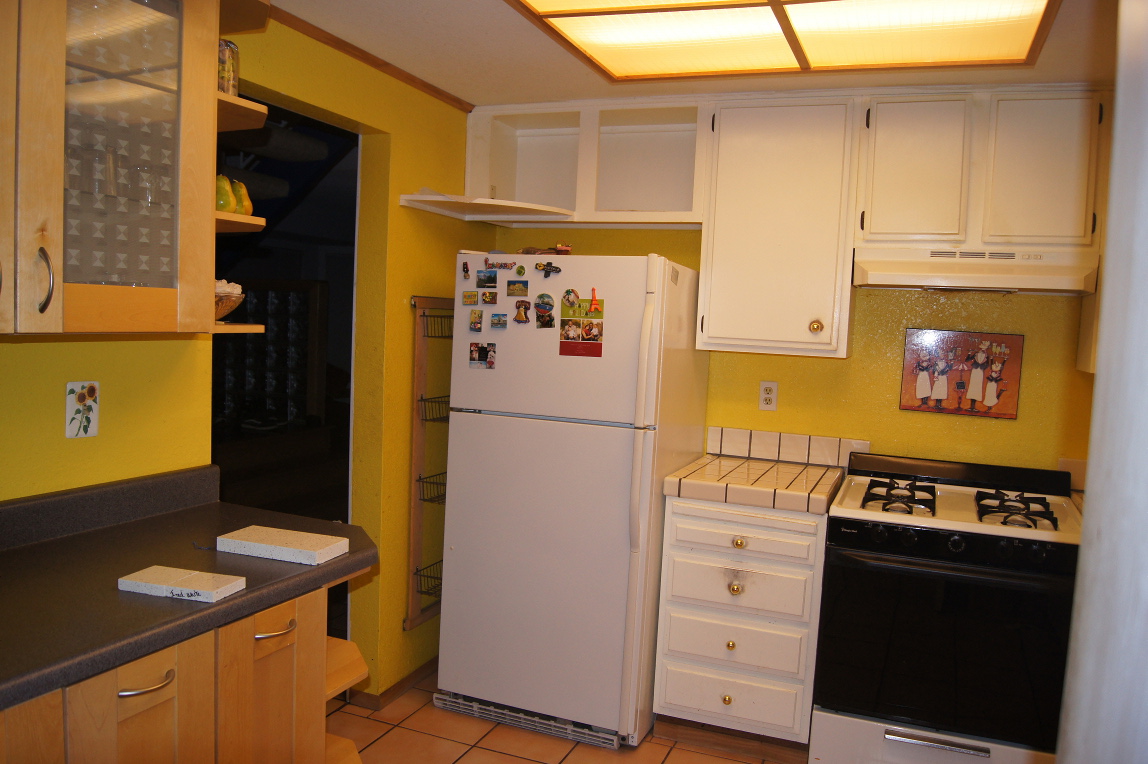
Thinking of upgrading your old 80’s style Kitchen and need an Ikea style Kitchen? Or is your wife pressuring/whipping your butt to take on this new project? Well, it’s quite a process and here’s a breakdown. And it’s NOT Cheap either (just so you know)
So here are the people involved (at least in the Bay Area – Silicon Valley, CA):
- Your General Contractor
- Traemand – Ikea Partner for Design & Cabinet installation
- United Marble & Granite – Ikea Partner for Countertops
- Plumber, Electrician or your General Contractor
Now here’s the step by step process – Yes. It has to be in this order and can take several weeks.
- DESIGN : Get a designer (Ikea partner – Traaemand) to design the Kitchen and come up with parts — $200 just to design it
- MATERIALS : From the design, buy all the cabinets etc. from Ikea and have it delivered (Best time is when Ikea has a 20% discount SALE)
- APPLIANCES : You might need to buy appliances from Ikea, Fry’s, Sears etc.
- DEMOLITION : (Week 1) Get a contractor to demolish your current kitchen
- NO KITCHEN : (Week 1-4) Prepare to live on Junk Food/Take Out
- CABINET INSTALLATION : (Week 1) Get Traemand folks to install the cabinets (or have your contractor do this)
- COUNTER TOP/SINK INSTALLATION : (Week 2-4) Work with UM&G to template the counter top and then have it cut and installed. You can find “other” places to speed up this step.
- APPLIANCE INSTALLATION : (Week 1-3) Have your General Contractor or the Store (Fry’s/Sears) install appliances
- PLUMBING : (Week 4) Get water to your sink and refrigerator. UM&G will not drill holes that go past the granite. So if there’s plywood your General Contractor need to take care of it and do the plumbing.
- ELECTRIAL : (Week 2-4) Gas/220V power supply etc. depending on your situation. Pain in the a$$ – Involve your General Contractor or Electrician
- BACK IN BUSINESS : (Week 4) Now you can cook at your own place
- BACKSPLASH : (Week 4-N) You might need to Home Depot this and have your contractor install it or do it yourself.
- PAINTING : (Week 4-N) Just do it yourself. Enough money spent alreadyl
There you go – Freaking pain in the a$$. It’s a complicated process, but Ikea is a name you can trust and it looks pretty cool (to me) in the end. So it’s worth the wait and the pain. Things can be buggy at times, but yeah just manage the project well and if you have a good contractor you should be good to go.
Here are the photos.
Category: Rants/Raves,Tips and Tricks
Writing by shivdev on Monday, 27 of August , 2012 at 4:25 am
You need to use the dConf Editor to set it up
Step 1: sudo apt-get install dconf-tools
or
Step 1: Ubuntu Software Center – Install dConf Editor
Step 2: com.canonical.indicator.datetime
Step 3: Check the show-date option
Category: Uncategorized
Writing by shivdev on Tuesday, 7 of August , 2012 at 9:37 pm
Sometimes your disk maybe full and your Oracle might not start up or your just having a bad day with Oracle, your IT dept, the build is broken etc. etc.
Well ./lsnrctl start works fine, but Oracle is still coming back with ORA-01034 and ORA-27101 errors. Apparently Oracle was shutdown and never came up.
$ sqlplus
Enter user-name: sys as sysdba
Enter password:
Connected to an idle instance.
SQL> startup
ORACLE instance started.
Now things should be better. You do know that with Oracle/Linux development work happening, chaos etc. , it won’t be long before you hit some more Oracle related issues. But for now, we’re good!
Category: SQL DB
Writing by shivdev on Friday, 3 of August , 2012 at 5:59 pm
It’s not surprising to me that after the pain of setting up Oracle, I would be running into further errors at random periods.
[oracle@sk-redhat bin]$ ./lsnrctl start
LSNRCTL for Linux: Version 11.2.0.2.0 – Production on 03-AUG-2012 10:44:45
Copyright (c) 1991, 2010, Oracle. All rights reserved.
Starting /home/oracle/OraHome11g/bin/tnslsnr: please wait…
TNSLSNR for Linux: Version 11.2.0.2.0 – Production
System parameter file is /home/oracle/OraHome11g/network/admin/listener.ora
Log messages written to /home/oracle/OraHome11g/log/diag/tnslsnr/sk-redhat/listener/alert/log.xml
Error listening on: (DESCRIPTION=(ADDRESS=(PROTOCOL=TCP)(HOST=15.15.15.15)(PORT=1521)))
TNS-12560: TNS:protocol adapter error
TNS-00584: Valid node checking configuration error
Listener failed to start. See the error message(s) above…
This time the fault was NOT on ORACLE issue, but rather the IT folks that had made some changes to the VMs and IP addresses etc. and my Invited nodes were not being recognized.
Check whether the entries in the following files are correct.
[oracle@sk-redhat bin]$vi /home/oracle/OraHome11g/network/admin/sqlnet.ora
[oracle@sk-redhat bin]$ su root
[root@sk-redhat bin]$ vi /etc/hosts
Ensure that IP Addresses and Hostnames and respective mappings are all accurate and everything is reachable.
Category: Tips and Tricks