Writing by shivdev on Monday, 29 of October , 2007 at 3:04 pm
Yes, I agree – Its painful. But remember, its Free. And the price to pay is that you have to do some some searching around to work around your problems. But yes, Microsoft should have been a little more relaxed and made life for us developers a little easier.
So my pain started with this error message.
Server: Msg 3205, Level 16, State 2, Line 1
Too many backup devices specified for backup or restore; only 64 are allowed.
Server: Msg 3013, Level 16, State 1, Line 1
RESTORE DATABASE is terminating abnormally.
Turns out they had installed SQL Server 2005 and then SQL Server 2000 (earlier version) later and that caused the screw up. There is a way (I don’t know yet) where you can override which version to use, for compatibility purposes. This link will tell you that its a forward compatibility issue. In my case, SQL Server 2005 was used for backing up and restoring.
So I went ahead and removed both these versions and reinstalled SQL Server 2005 Express Edition and thats when the real PAIN started.
An error has occurred while establishing a connection to the server. When connecting to SQL Server 2005, this failure may be caused by the fact that under the default settings SQL Server does not allow remote connections.
Remember, you have to configure SQL Server to allow remote connections. These posts show how.
But it STILL DID NOT WORK !!! Did some more searching and found the Problem.
The trick is in specifying the Server Instance correctly. By default it is SQLEXPRESS. So, if you were on the same machine your Server instance would be localhost/SQLEXPRESS. This post saved me
So there you go folks. Who would know SQLEXPRESS is the default instance name? Why don’t they just default it? Why don’t they just enable TCP/IP & named pipes for remote connections and save us the trouble? I mean I understand security concerns, but damn it there’s no data – Its an empty database. Once I have data I will disable whatever I don’t want.
Category: Rants/Raves,SQL DB
Writing by shivdev on Sunday, 28 of October , 2007 at 8:07 pm
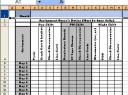 Looking to fit a bunch of columns on a page or improve readability of text in Excel by changing the alignment/orientation of the text? Then here are some steps.
- Select the Cell(s) you want to change alignment for
- Right Click and select Format Cells…
- Select the Alignment Tab
- Change the orientation by entering a degrees or dragging the orientation scale
- Hit OK
Category: Excel
Writing by shivdev on Thursday, 25 of October , 2007 at 4:46 pm
Remember, Javascript is not a strongly typed language. While using variables in Javascript, don’t bother about the type of data a variable is storing, instead what the variable is storing. These variables can store anything – even functions!! Here are some examples on using variables in Javascript.
var thisIsAString = 'This is a string';
var alsoAString = '25';
var isANumber = 25;
var isEqual = (alsoAString==isANumber);  // This is true, they are both 25.
var isEqual = (alsoAString===isANumber); // False one is a number,
                                         // the other a string.

var concat=alsoAString + isANumber;      // concat is now 2525
var addition=isANumber + isANumber;      // addition is now 50
var alsoANumber=3.05;     // is equal to 3.05 (usually).
var floatError=0.06+0.01; // is equal to 0.06999999999999999
var anExponent=1.23e+3;   // is equal to 1230

var hexadecimal = 0xff;   // is equal to 255.
var octal = 0377;         // is equal to 255.

var isTrue = true;   // This is a boolean, it can be true or false.
var isFalse= false;  // This is a boolean, it can be true or false

var isArray = [0, 'one', 2, 3, '4', 5]; // This is an array.
var four = isArray[4]; // assign a single array element to a variable.
                       // in this case four = '4'

var isObject = { 'color': 'blue',  // This is a Javascript object
                 'dog': 'bark',
                 'array': [0,1,2,3,4,5],
                 'myfunc': function () { alert('do something!'); }
               }

var dog = isObject.dog;  // dog now stores the string 'bark';
isObject.myfunc();       // creates an alert box with the value "do something!"
var someFunction = function() {
                      return "I am a function!";
}
var alsoAFunction = someFunction; //No () so alsoAFunction becomes a function
var result = alsoAFunction(); // alsoAFunction is executed here because ()
                              // executes the function so result stores the
                              // return value of the function which is
                              // "I am a function!"
Category: Javascript
Writing by shivdev on Thursday, 25 of October , 2007 at 2:50 pm
Getting started with WordPress? OK – First thing install WordPress. Remember your credentials. You will need them to keep up with the blogging. Go to your http://website/wordpress_location and get familiar. Its very intuitive. Then download plugins to make your blogs colorful. I downloaded Google Syntax Highlighter Plugin and Google Code Prettifier and Activated them.
Just google for wordpress plugins, download whatever you like and install it. Installation is usually as simple as copying them into the wordpress_location/wp-content/plugins folder. Any FTP program would do the job. Then go to the plugins page on the Word Press control panel and Activate the plugin. Then, use the plugin according to its desired usage usually <pre class=”plugin”> … code …</pre> Thats it. So Start Blogging !!
You may also want to make your WordPress Blog Search-Engine-Friendly by reading this article. Unfortunately with godaddy and few other providers the permalink titles might not work because of their security protocols.
Category: Wordpress